Manuscript prep for audiobook narrators
Mark a word once. The whole book remembers.
Pronunciation notes, voice memos and Apple Pencil ink, on the manuscript itself. Mark a name on page four and it glows on page three hundred, with your note and your own voice one tap away.
Free on iPhone, iPad and Mac. No account needed.
Try it here
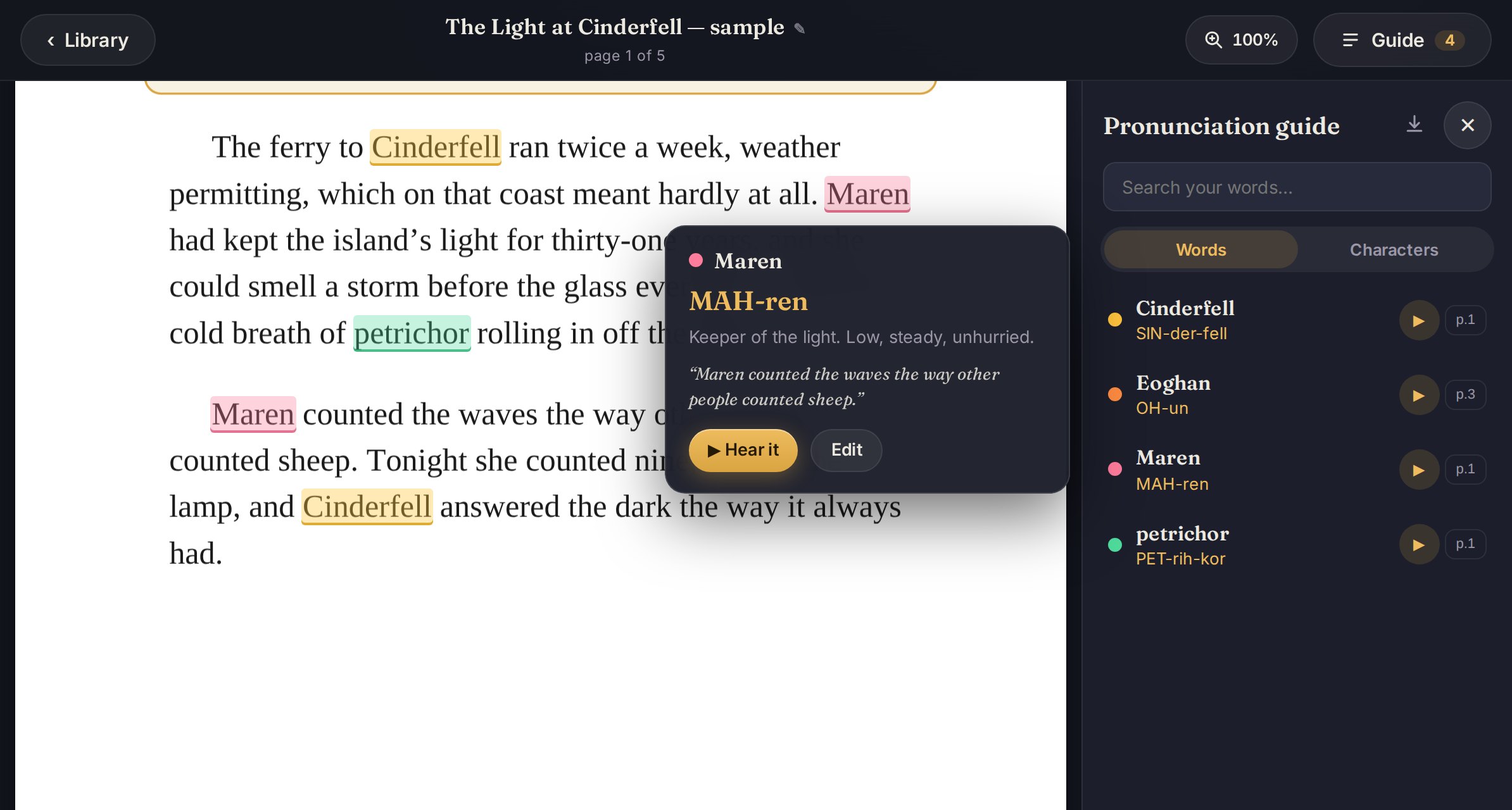
A page from the sample manuscript.
Three words are already marked. Tap any of them, then mark the two that aren't.
The ferry to Cinderfell ran twice a week, weather permitting, which on that coast meant hardly at all. Maren had kept the island’s light for thirty-one years, and she could smell a storm before the glass ever fell — that first cold breath of petrichor rolling in off the moor.
Maren counted the waves the way other people counted sheep. Tonight she counted nine, then lit the lamp, and Cinderfell answered the dark the way it always had.
The Keeper never said the boy’s name the way the mainland did. “Eoghan,” she said, the old way, and the ferrymen gave up correcting her. He had come across at eleven with one bag and a cough, and he stayed because nobody sent for him.
“You’ll keep this light one day,” the Keeper told him. Eoghan, who had never been promised anything, wrote it on the wall of the lamp room where she would never look.
The Light at Cinderfell · sampleTap a glowing word
Maren
MAH-ren
Keeper of the light. Low, steady, unhurried.
“Maren counted the waves the way other people counted sheep.”
Voice memo · plays in the appMarked once, glowing 2 times on this page.
Now mark a new word: tap .
What prep looks like with it.
Mark once, everywhere
Select a word, add how you say it, pick a color. Every occurrence in the book is highlighted, and the note travels with all of them.
Your voice, on the word
Record yourself saying it once. Tap the word anywhere in the book and hear it back. No more scrolling to the front for the cheat sheet.
Your cast
A character can have more than one name. “Maren” and “the Keeper” share one color and one voice memo, so however she is named, you hear how you decided she sounds.
Apple Pencil ink
Scribble in the margins with pressure-aware, low-latency ink. Your finger still scrolls. A pen tap on a word opens its note instead of drawing.
Built in a real booth
Prep on the iPad. Record with the same manuscript open.
Booth Notes was built by a working narrator for his own sessions. Prep on the couch with the Pencil, then open the same book on the Mac in the booth, every note and every memo already there. The Guide lists every word and every character, searchable, with page jumps, and it exports.
Books in a series share one cast, so the next book arrives already knowing how to say everyone’s name.
Free. Sync is the one thing that costs money.
Everything you prep stays on your device unless you turn sync on. No ads, no analytics, no tracking, and no account required.
Booth Notes
Free
One device, everything on it.
- Unlimited manuscripts, words, memos and ink
- The Guide, the cast, series sharing
- Backup to a file and restore anywhere
- Works fully offline
Booth Notes Pro
$39.99 / year · 14-day free trial
Every device you narrate from.
- Cloud sync: iPad, iPhone and Mac stay identical
- Your library comes back if a device is lost
- Sold by Apple, cancel any time in Settings
Questions narrators ask.
Do I need an account?
No. Tap “Not now” on the first screen and every feature works on that device. An account only exists to sync across devices, and that is what Pro pays for.
I work under NDA. Where does the manuscript go?
Nowhere, unless you turn sync on. Without sync the PDF, your notes and your memos never leave the device. With sync they are stored in your own account, readable only by you, and deleting the account deletes them.
What files does it take?
PDF manuscripts. If a publisher sends a Word file, export it to PDF first. Backups are a single file you can keep anywhere and restore on any device.
Does it work on the Mac?
Yes. It is the iPad app running on Apple Silicon Macs from the Mac App Store, with recording and playback. There is no Pencil on a Mac, so ink is read-only there.
Mark it once. Narrate the whole book.
Free on the App Store for iPhone, iPad and Mac.
Coming soon to the App Store — free, for iPhone, iPad and Mac.